Transaction Monitoring
TrustVision Transaction Monitoring is the console your fraud and risk teams use to screen transactions, face authentications and onboarding events in real time, investigate what was flagged, and send a final verdict back to your systems. It brings detection (rules, AI models, lists) and investigation (alerts, cases, decisions) into one workspace, with maker–checker approval and a full audit trail on every change.
What it's for
- Stop fraud before money leaves. Realtime rules evaluate every transaction before a decision is made and can hold it for an analyst, reject it, or let it pass.
- Find patterns over time. Aggregate rules look back across hours or days — bursts of failed sign-ins, repeated beneficiaries, sudden growth in volume — and open post-check cases for review.
- Work cases to a decision. Analysts see every hold with its SLA, the evidence behind it, and record a verdict with a mandatory reason. The verdict is delivered to your platform through a signed webhook.
- Change policy safely. New rules start in Shadow mode, every rule version needs a second reviewer, and settings changes require a reason and are stored in the change history.
How it works
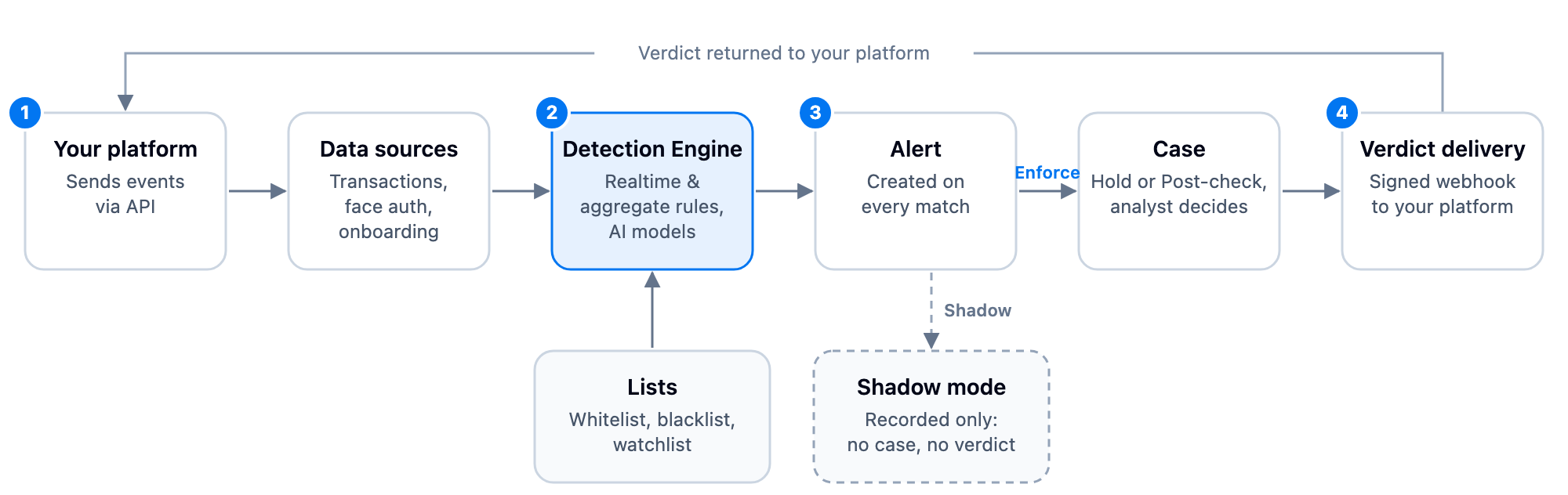
- Your platform sends events to a data source.
- The Detection Engine evaluates them against realtime rules, aggregate rules and AI models (with a library of ready-made rules to start from), using lists for trusted or restricted entities.
- Every match creates an alert. In Enforce mode a Review or Aggregate alert routes to a case (a Realtime Reject alert declines the transaction and opens no case); in Shadow mode it is only recorded.
- An analyst investigates and records a verdict. Hold verdicts are sent back to your platform through the configured webhook.
Two workspaces in one console
| Menu | Who uses it | Main pages |
|---|---|---|
| Transaction Monitoring | Fraud strategy, risk policy owners, integration engineers | Overview, Data sources, Lists, Detection rules, Alerts, Monitoring settings |
| Case Management | Fraud analysts, operations team leads | Overview, All cases, Workflow settings |
Key concepts at a glance
| Concept | Values | Meaning |
|---|---|---|
| Rule type | Realtime / Aggregate | Realtime evaluates each event before a decision; Aggregate runs on a schedule over a time window. |
| Mode | Shadow / Enforce | Shadow records alerts only. Enforce applies the rule's action and creates cases (except Reject, which opens none). |
| Risk level | Critical / High / Medium / Low | How serious a match is. Drives prioritisation and some bulk-action limits. |
| Case type | Hold / Post-check | Hold = transaction is paused waiting for a decision (with SLA). Post-check = review after the fact; never reverses the original transaction. |
| Case status | Open / In progress / Resolved | Where the investigation stands. |
Risk level, status and mode are independent attributes. A High risk alert can come from a Shadow rule, and a Critical case can still be Open.
Screenshots in this section use sample data. Names and other personal details are blurred; amounts, IDs and rule thresholds are illustrative and do not reflect any default configuration. UI labels are shown exactly as they appear on screen.
Related areas
- To connect your platform, see Integration Use Case — pass
transaction_datawith Face Authentication or Behavioral Biometrics, or call the standalone API. - To see the day-to-day analyst workflow, read Investigating cases.