Monitoring settings
Monitoring settings control whether detection runs, how its result is applied, and how final verdicts reach your platform. Because these settings affect live traffic, every change requires a reason, is reviewed as a before/after diff and is stored in the change history.
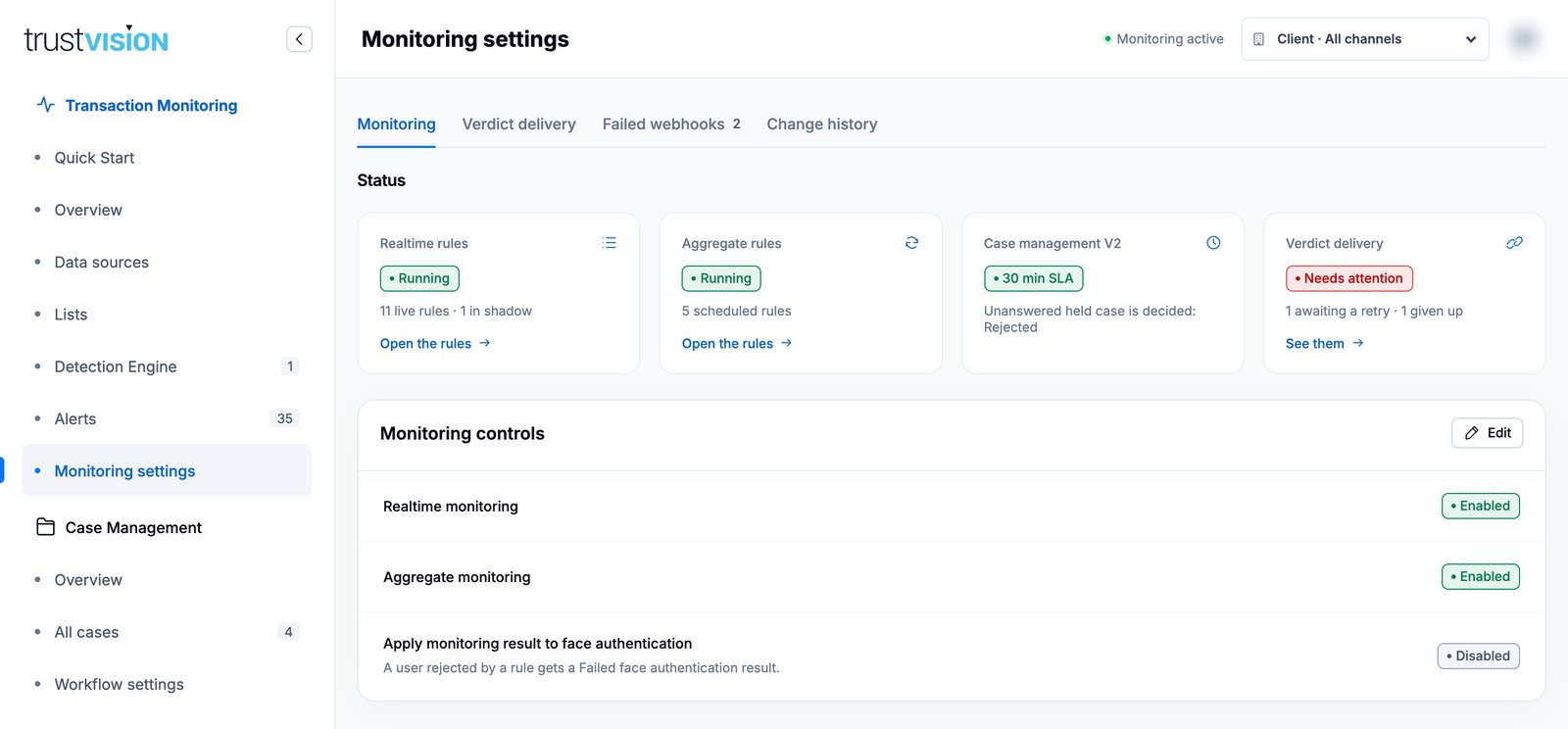
The page has four tabs: Monitoring, Verdict delivery, Failed webhooks and Change history.
What you can see
Status
Four cards summarise the current state:
- Realtime rules — running or paused, live rules and how many are in shadow.
- Aggregate rules — running or paused, number of scheduled rules.
- Case management — the hold SLA and the decision applied when it expires.
- Verdict delivery — healthy, or Needs attention when deliveries are awaiting retry or have been given up.
Failed webhooks
The Webhook delivery queue lists deliveries that did not succeed: the case, status and next attempt, number of attempts and the last error. Click Retry to resend one. A successful retry updates the queue and is recorded in the change history. The counter next to Failed webhooks shows how many are outstanding.
Change history
Every configuration change, with the author, time, scope (client or access key) and the reason entered.
What you can configure
Monitoring controls
| Setting | What it does |
|---|---|
| Realtime monitoring | Turns realtime rule evaluation on or off. |
| Aggregate monitoring | Turns scheduled aggregate rules on or off. |
| Apply monitoring result to face authentication | When enabled, a user rejected by a rule gets a Failed face authentication result. |
When both realtime and aggregate monitoring are off, the header shows Monitoring paused.
Verdict delivery
Configure the webhook that receives final case outcomes:
- Webhook URL — a public HTTPS endpoint.
- Signing secret — used to sign outgoing payloads so your endpoint can verify they come from TrustVision. The secret is never displayed after it is saved; enter a new one only to replace it.
- Post-check verdict delivery — also send post-check outcomes. Hold verdicts are always delivered when an endpoint is configured.
Refer to the TrustVision API documentation for the webhook payload format and how to verify the signature. Reject any request whose signature does not match.
Change a setting
- Click Edit on the section.
- Change the values.
- Enter a Reason for change (required, stored in the history).
- Click Review changes to see a before → after summary.
- Click Save changes, or Back to adjust.
When an access key is selected in the header, changes are saved as overrides for that access key only, and Inherit client defaults removes the override. Any value you do not override inherits from the client default, so set common policy once at client level and override only what differs per channel.
Related areas
- For SLA and case grouping, with the same edit and review flow, see Workflow settings.
- For pipeline health and delivery status, see Monitoring overview.