React Native 3.0.x ui only
Installation
Common
1. Add Trust Vision React Native lib
Add to package.json file under dependencies group:
"react-native-trust-vision-SDK": "git+https://<github_token>:[email protected]/tsocial/<repo_name>#<version_tag_name>"
2. Run
$ yarn
iOS
1. Add to podfile
...
pod 'RNTrustVisionRnsdkFramework', path: '../node_modules/react-native-trust-vision-SDK'

...

# Add below lines to the end of podfile
post_install do |installer|
    installer.pods_project.targets.each do |target|
        // you can add more modules which have the error "Undefined symbol" into the list
        if ['CocoaLumberjack', 'TensorFlowLiteC', 'TensorFlowLiteSwift', 'PromiseKit', 'lottie-ios'].include? "#{target}"
            target.build_configurations.each do |config|
                config.build_settings['BUILD_LIBRARY_FOR_DISTRIBUTION'] = 'YES'
            end
        end
    end
end
2. Run
$ pod install
Android
Add to root-level build.gradle file (host app):
maven {
     url("$rootDir/../node_modules/react-native-trust-vision-SDK/android/repo")
}
eg:
allprojects {
    repositories {
        mavenLocal()
        ...
        maven {
             url("$rootDir/../node_modules/react-native-trust-vision-SDK/android/repo")
        }
        google()
        jcenter()
        maven { url 'https://jitpack.io' }
    }
}
Add to app/build.gradle
android {
    ...
    aaptOptions {
        noCompress "tflite"
        noCompress "lite"
    }
}
Usage
import { NativeEventEmitter } from "react-native";

import RNTrustVisionRnsdkFramework, {
  TVConst,
  TVErrorCode,
  TVThemeCustomization,
} from "react-native-trust-vision-SDK";
Full steps:
try {
  await RNTrustVisionRnsdkFramework.initialize(
    clientSettingJsonString,
    "vi",
    true
  );

  const tvsdkEmitter = new NativeEventEmitter(RNTrustVisionRnsdkFramework);
  // Listen to the events during the capturing
  const subscription = tvsdkEmitter.addListener("TVSDKEvent", (event) => {
    console.log("TVSDK - " + event.name + " - " + event.params.page_name);
  });

  // Listen to the frame batches recorded during the capturing
  const framesRecordedSubscription = tvsdkEmitter.addListener(
    "TVSDKFrameBatch",
    (event) => {
      console.log("TVSDK - " + "FrameBatch: ", obj);
      // upload frame batch to server using this api:
      // https://ekyc.trustingsocial.com/api-reference/customer-api/#upload-videoaudioframes
    }
  );

  const cardType = {
    id: "card_id",
    name: "card_name",
    orientation: TVConst.Orientation.HORIZONTAL,
    hasBackSide: true,
  };
  const idConfig = {
    cardType: cardType,
    isEnableSound: false,
    isReadBothSide: true,
    cardSide: TVConst.CardSide.FRONT,
  };
  console.log("Id Config", idConfig);
  const idResult = await RNTrustVisionRnsdkFramework.startIdCapturing(idConfig);
  console.log("Id Result", idResult);
} catch (e) {
  console.log("Error: ", e.code, " - ", e.message);
}
1. Initialize SDK
SDK needs to be initialized first
await RNTrustVisionRnsdkFramework.initialize(
  clientSettingJsonString,
  "vi", // language code
  customizedTVTheme, // cusomized theme
  true // enable event or not
);
Options:
- clientSettingsJsonString:
string. The jsonConfigurationByServer is optional but recommended. It's the setting specialized for each client from TS server. It's the response json string get by API https://ekyc.trustingsocial.com/api-reference/customer-api/#get-client-settings. When it's null or unmatched with the expected type then the default setting in the SDK will be used. - languageCode:
string. Language code.vioren - customizedTVTheme:
TVTheme. UI customization theme. Use to customize the SDK's UI. - enableEventTracking:
bool. Enable event tracking or not
2. Start the SDK
The SDK provides some built in functions to capture id, selfie, liveness...
2.2. Start ID card capturing
2.2.1. Set config parameters
const idConfig = {
  cardType: cardType,
  cardSide: TVConst.CardSide.FRONT,
  isEnableSound: false,
  isReadBothSide: true,
  skipConfirmScreen: true,
  isEnablePhotoGalleryPicker: false,
};
Options:
- cardType:
CardType. Card type - cardSide:
TVConst.CardSide. Card side - isEnableSound:
bool. Sound is played or not - isReadBothSide:
bool. Read both sides of id card or not - skipConfirmScreen:
bool. Skip confirmation screen or not - isEnablePhotoGalleryPicker:
bool. Allow user select id card image from phone gallery
2.2.2. Start flow
const result = await RNTrustVisionRnsdkFramework.startIdCapturing(config);
2.2.3. Handle Id card images
if result.frontIdQr.is_required is true then result.frontIdQr.images array should be non-empty. Otherwise, clients should be warned to re-capture id card photos.
QR imagegs will be uploaded with this api: https://ekyc.trustingsocial.com/api-reference/customer-api/#upload-image
- Fields:
- data:
result.frontIdQr.images[i].raw_image_base64 - label:
result.frontIdQr.images[i].label - metadata:
result.frontIdQr.images[i].metadata
- data:
*The same logic will be applied to result.backIdQr
2.3. Start selfie capturing
2.3.1. Set config parameters
const config = {
  cameraOption: TVConst.SelfieCameraMode.FRONT,
  isEnableSound: true,
  livenessMode: TVConst.LivenessMode.PASSIVE,
  skipConfirmScreen: true,
};
Options:
- cameraOption:
TVConst.SelfieCameraMode. Camera option - isEnableSound:
bool. Sound is played or not - livenessMode:
TVConst.LivenessMode. Liveness mode - skipConfirmScreen:
bool. Skip confirmation screen or not
2.3.2. Start flow
const selfieCapturingResult =
  await RNTrustVisionRnsdkFramework.startSelfieCapturing(config);
2.3.3. Frame Batch recorded during the capturing.
Note: Ignore this section if Frame recording is disabled by client settings.
var frameBatchIdsDictionary = []; // this dictionary will be used for liveness verification
// frameBatchIdsDictionary.push({
//    key:   <id_returned_from_sdk>,
//    value: <id_returned_from_server>
// });

// Listen to the frame batches recorded during the capturing
const framesRecordedSubscription = tvsdkEmitter.addListener(
  "TVSDKFrameBatch",
  async (frameBatch) => {
    console.log("TVSDK - " + "FrameBatch: ", frameBatch);
    // upload frame batch to server using this api:
    // https://ekyc.trustingsocial.com/api-reference/customer-api/#upload-videoaudioframes
    const uploadingResult = await uploadFrameBatch(frameBatch);
    frameBatchIdsDictionary.push({
      key: frameBatch.batchId,
      value: uploadingResult.fileId,
    });
  }
);
2.3.4. Handle selfie capturing results
2.3.4.1 Remove invalid frame batch ids
Note: Ignore this section if Frame recording is disabled by client settings.
Only frame batches of Selfie capturing which id is containing in selfieCapturingResult.livenessFrameBatchIds are valid to be used for liveness verification.
// Remove all invalid batch ids:
Object.entries(frameBatchIdsDictionary).map(
  ([id_returned_from_sdk, id_returned_from_server]) => {
    if (
      !selfieCapturingResult.livenessFrameBatchIds.includes(
        id_returned_from_sdk
      )
    ) {
      delete frameBatchIdsDictionary[id_returned_from_sdk];
    }
  }
);
2.3.4.2. Use this api to get image id:
https://ekyc.trustingsocial.com/api-reference/customer-api/#upload-image
id of frontal image i = image id of selfieCapturingResult.selfieImages[i].frontal_image.raw_image_base64
id of gesture image i = image id of selfieCapturingResult.selfieImages[i].gesture_image.raw_image_base64
2.3.4.3. Call this api to check liveness
https://ekyc.trustingsocial.com/api-reference/customer-api/#verify-face-liveness with params
imagesfield, each element contains:
{
  "id": "<id of frontal image i>"
}
gesture_imagesfield, each element contains:
{
  "gesture": "lower case string of <selfieCapturingResult.selfieImages[i].gesture_type>",
  "images": [
    {
      "id": "<id of gesture image i>"
    }
  ]
}
videosfield is the list of frame batch ids returned from server, which are the values offrameBatchIdsDictionaryNote: Ignore this field if Frame recording is disabled by client settings.
{
"id": "<frameBatchIdsDictionary's values[0]>"
},
{
"id": "<frameBatchIdsDictionary's values[1]>"
}
...
metadatafield isselfieCapturingResult.livenessMetadata
3. Result Handling:
result:
cardType:
CardType. Card typeactionMode:
TVConst.ActionMode. Action ModeselfieImages:
[SelfieImage]. List of selfie image objectslivenessVideos:
[Base64 String]. List of liveness videos data base64livenessMetadata:
jsonlivenessVideoFramesList:
[json]idFrontImage:
ImageClass. Id front image objectidBackImage:
ImageClass. Id back image objectfrontIdQr:
TVCardQr. Front Id card's QR infobackIdQr:
TVCardQr. Back Id card's QR infofrontIdCapturingVideoFramesList:
jsonbackIdCapturingVideoFramesList:
json
SelfieImage:
- gesture_type:
String.UP | DOWN | LEFT | RIGHT | FRONTAL - frontal_image:
ImageClass. Frontal image object - gesture_image:
ImageClass. Gesture image object
- gesture_type:
ImageClass:
- raw_image_base64:
String. Base64 string of image data - label:
String. Image label - metadata:
json. Image metadata
- raw_image_base64:
TVCardQr:
- is_required:
Bool. This side of card contains QR or not - images:
[ImageClass]. QR images
- is_required:
Error:
- errorCode:
String. The specific error code - description:
String. The human-readable error description can be show to end user
- errorCode:
UI Customization
This document introduces how to enable the ability to customize UI components of TrustingVision SDK.
Default UI prototypes
Check out the default UI of TrustingVision SDK. We provide you the ability to change and modify many UI components: background colors, font interfaces, font sizes, icons, buttons.


Before initialize the SDK
Initialize and change properties of TVTheme class. If any of which is not set, it will get default value.
After that, input the instance of TVTheme as a parameter of the TV SDK's initialization method. See Initialize TV SDK
TVTheme let you custom and override attributes, which includes:
| Properties/Functions | Type | Description |
|---|---|---|
idCapturingTheme | TVIdCapturingTheme | Attributes that change the UI of ID Card Detection screen. |
idConfirmationTheme | TVIdConfirmationTheme | Attributes that change the UI of ID Confirmation screen. |
selfieCapturingTheme | TVSelfieCapturingTheme | Attributes that change the UI of Selfie Capturing screen. |
selfieConfirmationTheme | TVSelfieConfirmationTheme | Attributes that change the UI of Selfie Confirmation screen. |
qrGuidelinePopupTheme | TVQrPopupTheme | Modifying UI of QR guideline popup. |
qrRetryPopupTheme | TVQrPopupTheme | Modifying UI of QR retry popup. |
Common UI components
Object TVThemeDefaultValues helps you to quickly change some common UI components that will be used across the whole SDK.
In case a specific Screen's theme is set, it will override TVThemeDefaultValues's properties.
| Properties | Type | Description |
|---|---|---|
normalLabelTheme | TVLabelTheme | Normal text of SDK. |
titleLabelTheme | TVLabelTheme | The title of every screen (located on the top-most, centered of screen). |
errorLabelTheme | TVLabelTheme | This text is shown as if any user misconduction or system failure occurred during the detection process. |
instructionLabelTheme | TVLabelTheme | Instruction text. |
timeoutLabelTheme | TVLabelTheme | The count down text. |
The object TVLabelTheme can be described in this table below:
| Properties/Functions | Type | Label's |
|---|---|---|
fontStyle | String | font style, valid values: "REGULAR", "BOLD", "BOLD_ITALIC", "ITALIC" |
textSize | Float | text size |
textColor | String (hex color e.g "#FFFFFF") | text color |
textGravity | String | text alignment of its frame. Valid values: "CENTER", "LEFT", "RIGHT" |
backgroundColors | [String] (array of hex colors e.g ["#00FFFFFF", "#000000"]) | background colors. If total elements of this array is >= 2, the background color is gradient, else it'd be solid. |
isBackgroundGradientHorizontal | Boolean | background gradient direction |
cornerRadius | Float | rounded corner |
isHidden | Boolean | whether or not should hide the label |
borderWidth | Float | border width |
borderColor | String (hex color e.g "#00FFFFFF") | border color |
ID Card Detection: UI customization
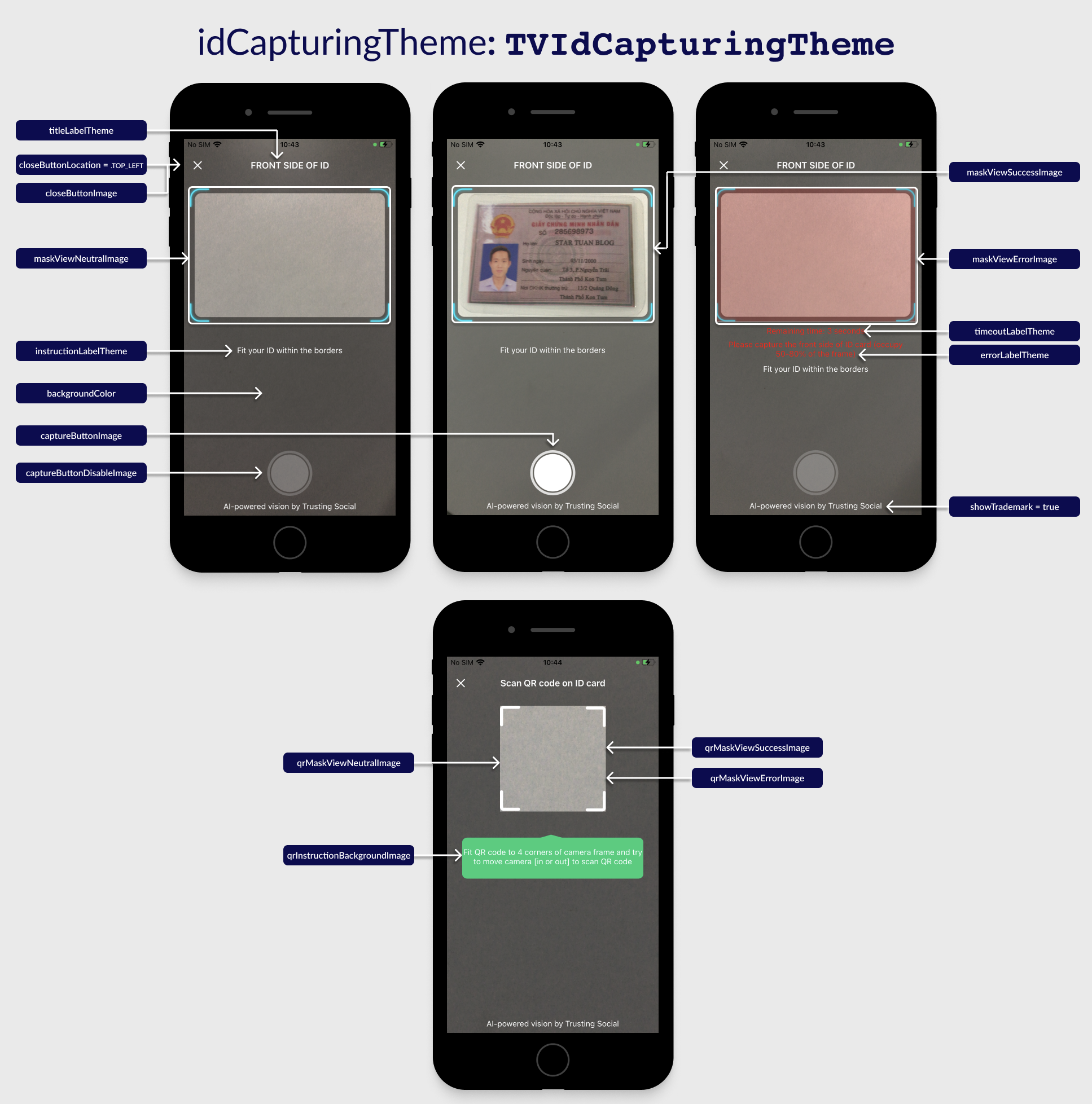
Class TVIdCapturingTheme
If a property is not set then the default value will be used.
| Properties/Functions | Type | Description |
|---|---|---|
titleLabelTheme | TVLabelTheme | See Common UI components section. |
instructionLabelTheme | TVLabelTheme | |
errorLabelTheme | TVLabelTheme | |
timeoutLabelTheme | TVLabelTheme | |
normalLabelTheme | TVLabelTheme | |
qrInstructionLabelTheme | TVLabelTheme | The instruction text that show during QR scanning process. |
closeButtonLocation | String | The position of close button to device orientation:TOP_LEFT: to the left of the title TOP_RIGHT: to the right of the title NONE: hide the button |
showTrademark | Boolean | Show the trademark text or not. |
backgroundColor | String (hex color e.g "#FFFFFF") | Background color of the screen. Default value is black with 60% opacity. |
captureButtonImage | String (Base64 encoding) | The image of the capture button. |
captureButtonDisableImage | String (Base64 encoding) | The image of the disabled capture button. |
closeButtonImage | String (Base64 encoding) | The image of the close view button. |
maskViewNeutralImage | String (Base64 encoding) | The mask image of camera view when start the ID Capture flow. |
maskViewSuccessImage | String (Base64 encoding) | The mask image of camera view when detected a valid ID card. |
maskViewErrorImage | String (Base64 encoding) | The mask image of camera view when cannot detect any ID card. |
qrInstructionBackgroundImage | String (Base64 encoding) | The image behind the QR instruction text. |
qrMaskViewNeutralImage | String (Base64 encoding) | The mask image of camera view when start QR detection or not detected any QR code. |
qrMaskViewSuccessImage | String (Base64 encoding) | The mask image of camera view when detected a valid QR code. |
qrMaskViewErrorImage | String (Base64 encoding) | The mask image of camera view when detected an invalid QR code. |
loadingImage | String (Base64 encoding) | Loading indicator in image. |
ID Card Confirmation: UI customization
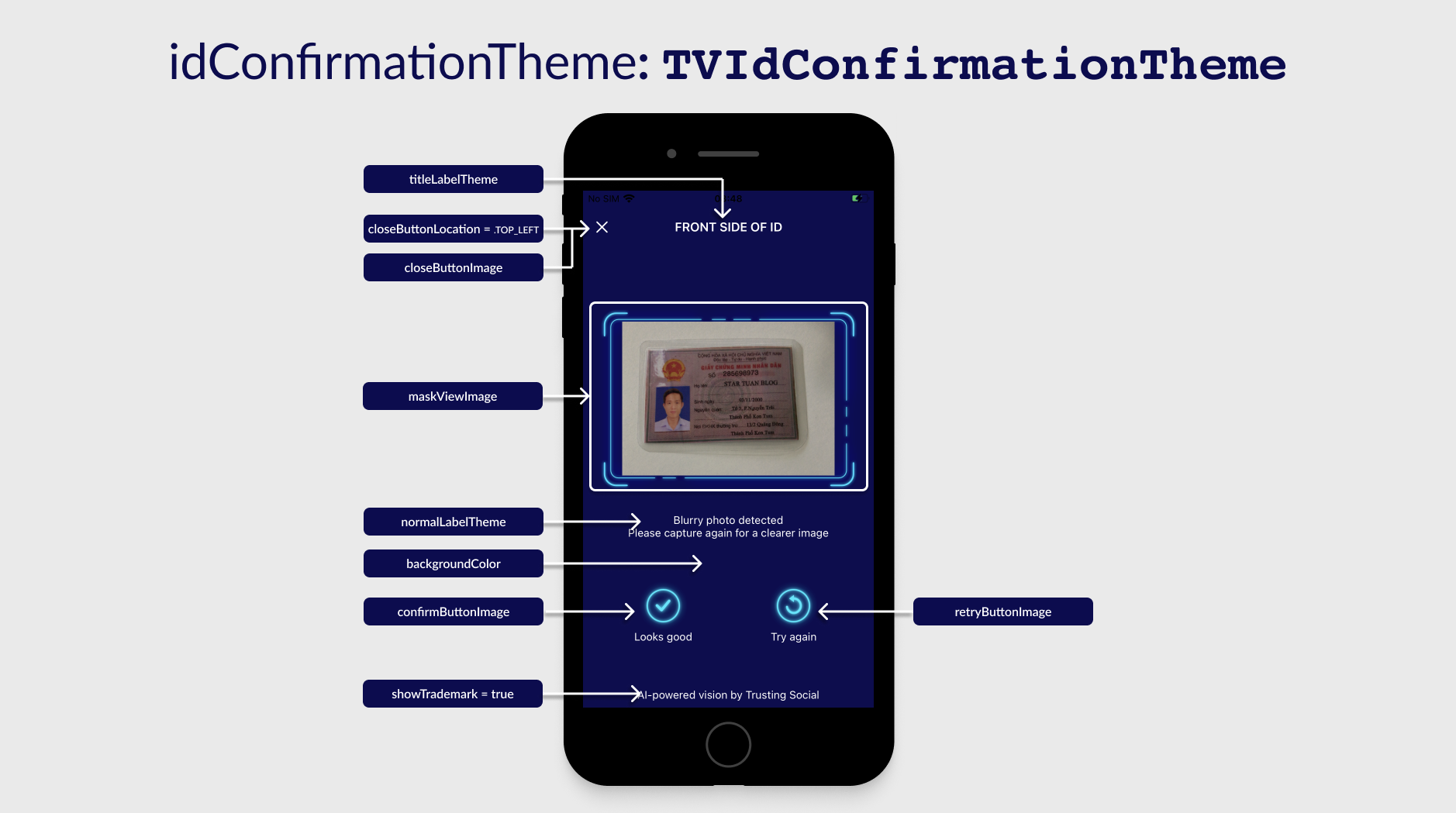
Class TVIdConfirmationTheme
If a property is not set then the default value will be used.
| Properties/Functions | Type | Description |
|---|---|---|
titleLabelTheme | TVLabelTheme | See Common UI components section. |
errorLabelTheme | TVLabelTheme | |
normalLabelTheme | TVLabelTheme | |
closeButtonLocation | String | The position of close button to device orientation: TOP_LEFT: to the left of the title TOP_RIGHT: to the right of the title NONE: hide the button |
showTrademark | Boolean | Show the trademark text or not. |
backgroundColor | String (hex color e.g "#FFFFFF") | Background color of the screen. Default value is black with 60% opacity. . |
closeButtonImage | String (Base64 encoding) | The image of the close view button. |
confirmButtonImage | String (Base64 encoding) | The image of the "Look good" button. |
retryButtonImage | String (Base64 encoding) | The image of the "Try again" button. |
icQrResultSuccessImage | String (Base64 encoding) | Icon before text that scanned QR successfully. |
icQrResultErrorImage | String (Base64 encoding) | Icon before text that scanned QR failed. |
maskViewImage | String (Base64 encoding) | The mask image of camera view showing captured image. |
loadingImage | String (Base64 encoding) | Loading indicator in image. |
Selfie Capturing: UI customization
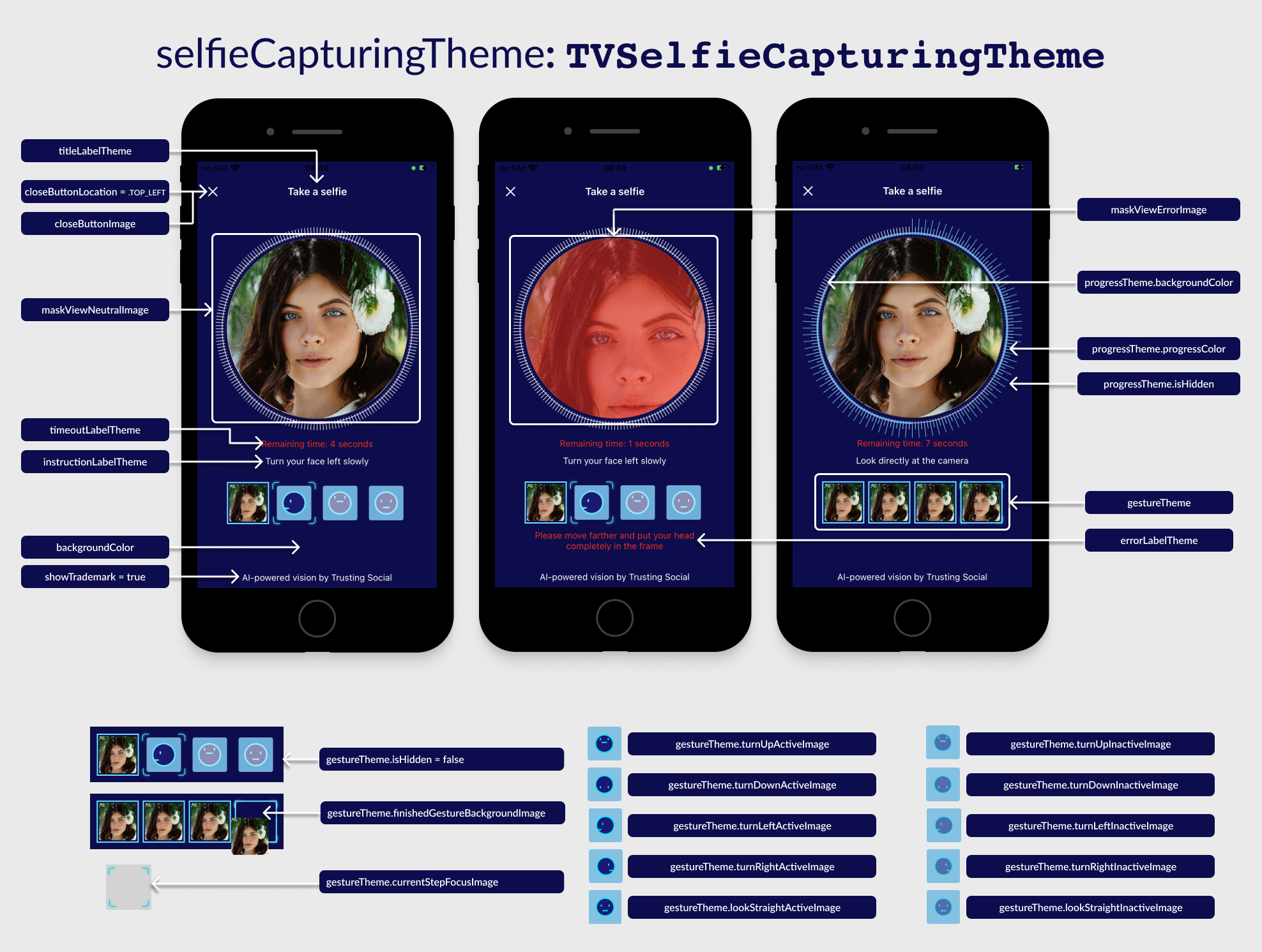
Class TVSelfieCapturingTheme
If a property is not set then the default value will be used.
| Properties/Functions | Type | Description |
|---|---|---|
titleLabelTheme | TVLabelTheme | See Common UI components section. |
instructionLabelTheme | TVLabelTheme | |
errorLabelTheme | TVLabelTheme | |
timeoutLabelTheme | TVLabelTheme | |
normalLabelTheme | TVLabelTheme | |
closeButtonLocation | String | The position of close button to device orientation: TOP_LEFT: to the left of the title TOP_RIGHT: to the right of the title NONE: hide the button |
showTrademark | Boolean | Show the trademark text or not. |
backgroundColor | String (hex color e.g "#FFFFFF") | Background color of the screen. Default value is black with 60% opacity. |
captureButtonImage | String (Base64 encoding) | The image of the capture button. |
captureButtonDisableImage | String (Base64 encoding) | The image of the disabled capture button. |
closeButtonImage | String (Base64 encoding) | The image of the close view button. |
switchCameraSideImage | String (Base64 encoding) | The image of switch camera button. |
maskViewNeutralImage | String (Base64 encoding) | The mask image of camera view when start the selfie flow. |
maskViewSuccessImage | String (Base64 encoding) | The mask image of camera view when detected a valid face. |
maskViewErrorImage | String (Base64 encoding) | The mask image of camera view when cannot detect any valid face. |
progressTheme.isHidden | Boolean | Whether or not should hide the current 4 steps view. |
progressTheme.backgroundColor | String (hex color e.g "#00FFFFFF") | Background color of the circle progress theme. |
progressTheme.progressColor | String (hex color e.g "#00FFFFFF") | Background color of the progress steps. |
gestureTheme.isHidden | Boolean | Whether of not should hide selfie steps' group view. |
gestureTheme.turnLeftActiveImage | String (Base64 encoding) | Image for turn left step gesture when active. |
gestureTheme.turnRightActiveImage | String (Base64 encoding) | Image for turn right step gesture when active. |
gestureTheme.turnUpActiveImage | String (Base64 encoding) | Image for turn up step gesture when active. |
gestureTheme.turnDownActiveImage | String (Base64 encoding) | Image for turn down step gesture when active. |
gestureTheme.lookStraightActiveImage | String (Base64 encoding) | Image for look straight step gesture when active. |
gestureTheme.turnLeftInactiveImage | String (Base64 encoding) | Image for turn left step gesture when inactive. |
gestureTheme.turnRightInactiveImage | String (Base64 encoding) | Image for turn right step gesture when inactive. |
gestureTheme.turnUpInactiveImage | String (Base64 encoding) | Image for turn up step gesture when inactive. |
gestureTheme.turnDownInactiveImage | String (Base64 encoding) | Image for turn down step gesture when inactive. |
gestureTheme.lookStraightInactiveImage | String (Base64 encoding) | Image for look straight step gesture when inactive. |
gestureTheme.finishedGestureBackgroundImage | String (Base64 encoding) | Background for every step that completed. |
gestureTheme.currentStepFocusImage | String (Base64 encoding) | Image overlay for current step indicator. |
maskViewErrorImage | String (Base64 encoding) | The mask image of camera view when cannot detect any valid face. |
maskViewErrorImage | String (Base64 encoding) | The mask image of camera view when cannot detect any valid face. |
loadingImage | String (Base64 encoding) | Loading indicator in image. |
Selfie Confirmation: UI customization
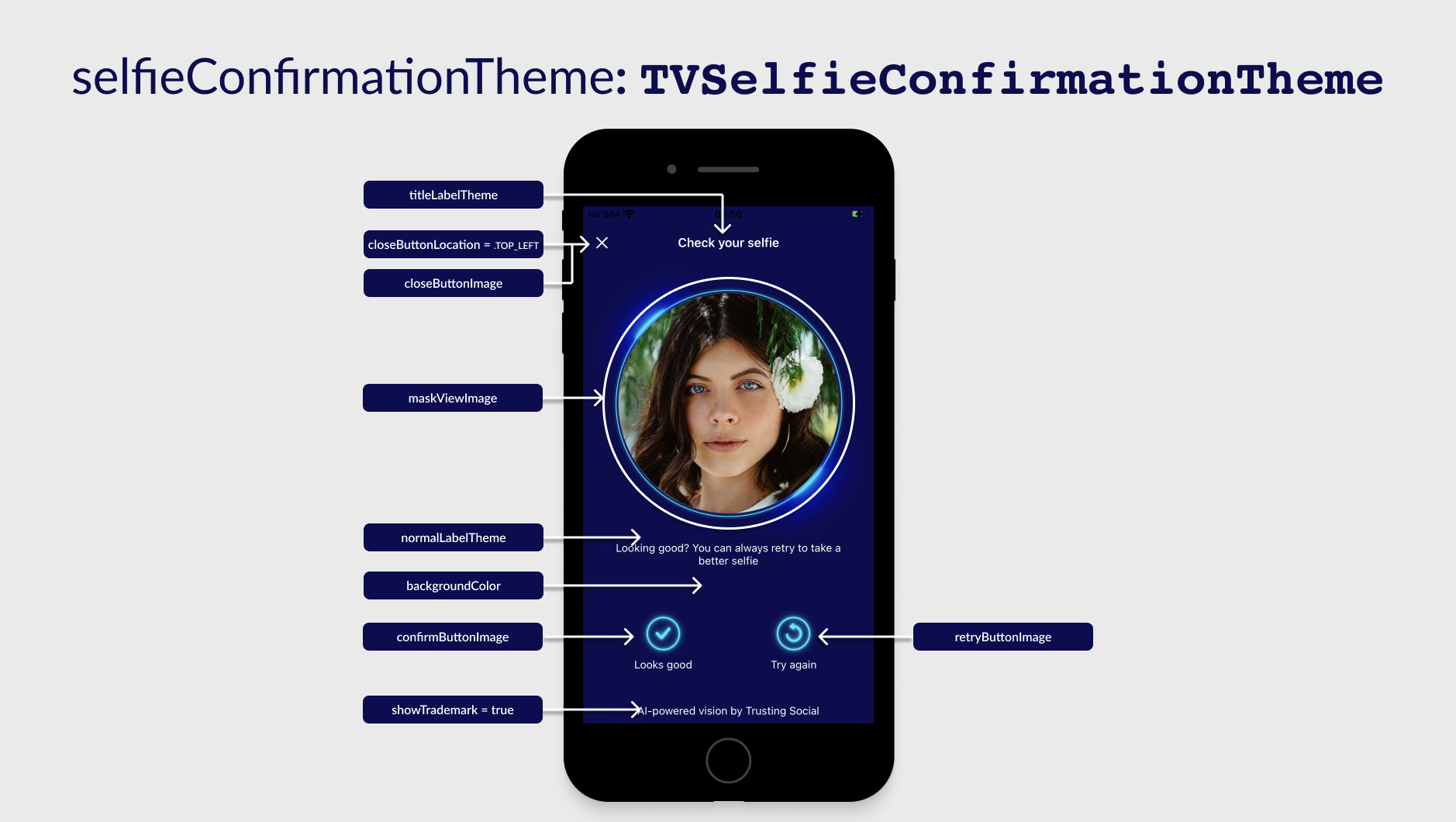
Class TVSelfieConfirmationTheme
If a property is not set then the default value will be used.
| Properties/Functions | Type | Description |
|---|---|---|
titleLabelTheme | TVLabelTheme | See Common UI components section. |
normalLabelTheme | TVLabelTheme | |
closeButtonLocation | String | The position of close button to device orientation: TOP_LEFT: to the left of the title TOP_RIGHT: to the right of the title NONE: hide the button |
showTrademark | Boolean | Show the trademark text or not. |
backgroundColor | String (hex color e.g "#00FFFFFF") | Background color of the screen. Default value is black with 60% opacity. |
closeButtonImage | String (Base64 encoding) | The image of the close view button. |
maskViewImage | String (Base64 encoding) | The mask image of selfie captured image. |
loadingImage | String (Base64 encoding) | Loading indicator in image. |
QR Popup: UI customization
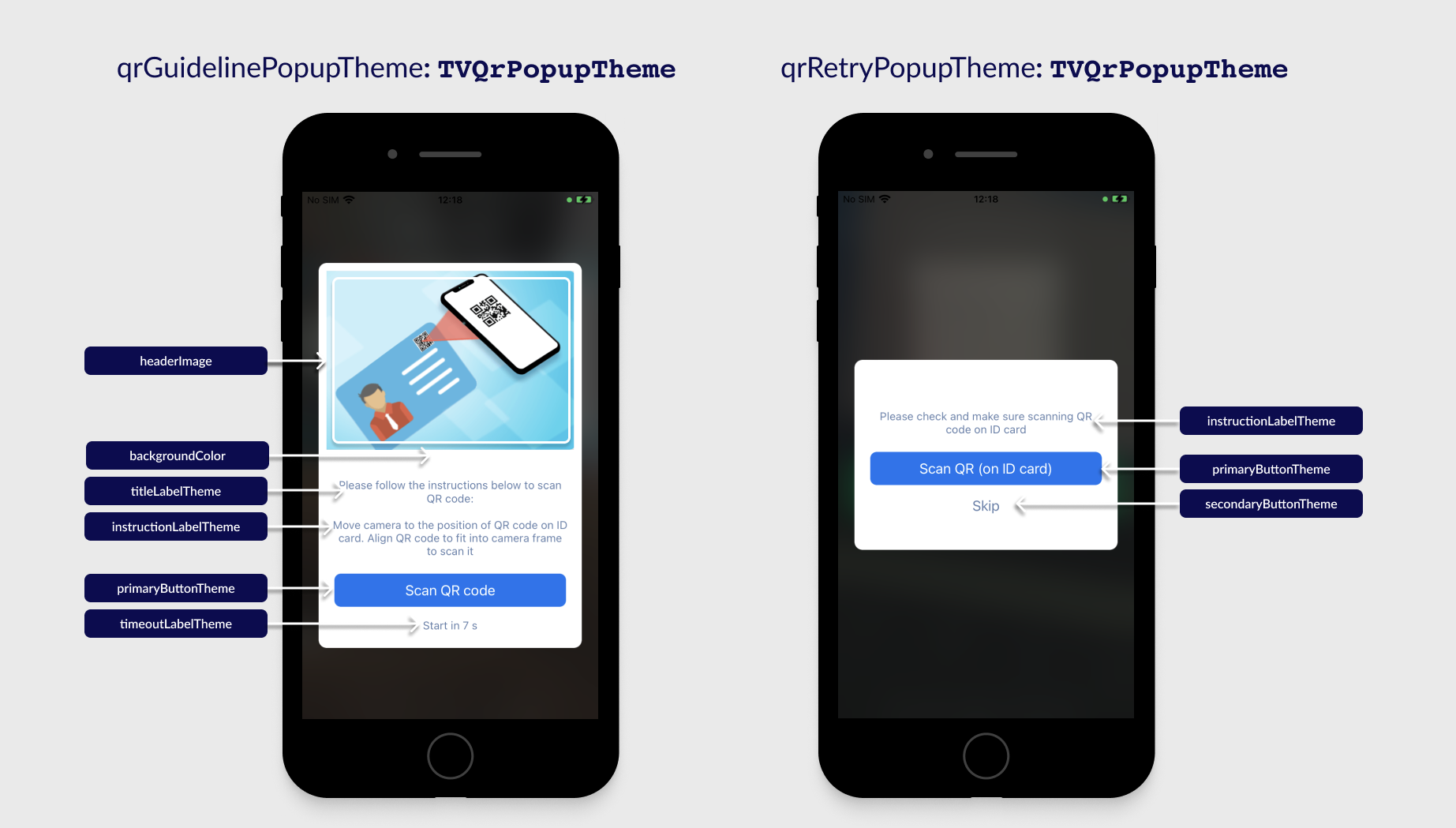
Class TVQrPopupTheme
If a property is not set then the default value will be used.
| Properties/Functions | Type | Description |
|---|---|---|
titleLabelTheme | TVLabelTheme | See Common UI components section. |
descriptionTheme | TVLabelTheme | Theme of description text. |
primaryButtonTheme | TVLabelTheme | Theme of the main button of popup. |
secondaryButtonTheme | TVLabelTheme | Theme of sub-button of popup. |
timeoutLabelTheme | TVLabelTheme | Theme of timeout-warning text. |
backgroundColor | String (hex color e.g "#FFFFFF") | Background color of the view. |
UI Customization example
const customizedTVTheme = () => {
  const normalTextSize = 14.0;
  const labelBackgroundColors = ["#00ffffff"]; // transparent. Set multiple colors if you want gradient
  const normalLabelTextColor = "#ffffff"; // white
  const errorLabelTextColor = "#ff0000"; //red
  const labelBorderColor = "#00ffffff"; // transparent
  const screenBackgroundColor = "#0D0D51"; // blue
  const labelBorderWidth = 1.0;
  const labelPaddingHorizontal = 10.0;
  const labelPaddingVertical = 5.0;
  const cornerRadius = 0.0;

  const normalLabelTheme = {
    isHidden: false,
    textSize: normalTextSize,
    fontStyle: TVThemeCustomization.FontStyle.REGULAR,
    textColor: normalLabelTextColor,
    backgroundColors: labelBackgroundColors,
    isBackgroundGradientHorizontal: false,
    cornerRadius: cornerRadius,
    borderWidth: labelBorderWidth,
    borderColor: labelBorderColor, // transparent
    paddingHorizontal: labelPaddingHorizontal,
    paddingVertical: labelPaddingVertical,
    textGravity: TVThemeCustomization.TextGravity.CENTER,
  };

  const titleLabelTheme = {};
  Object.assign(titleLabelTheme, normalLabelTheme);
  titleLabelTheme["textSize"] = 16.0;
  titleLabelTheme["fontStyle"] = TVThemeCustomization.FontStyle.BOLD;

  const errorLabelTheme = {};
  Object.assign(errorLabelTheme, normalLabelTheme);
  errorLabelTheme["textSize"] = 12.0;
  errorLabelTheme["textColor"] = errorLabelTextColor;

  const timeoutLabelTheme = {};
  Object.assign(timeoutLabelTheme, errorLabelTheme);
  timeoutLabelTheme["isHidden"] = true;

  const idCapturingTheme = {
    titleLabelTheme: titleLabelTheme,
    instructionLabelTheme: normalLabelTheme,
    errorLabelTheme: errorLabelTheme,
    timeoutLabelTheme: timeoutLabelTheme,
    normalLabelTheme: normalLabelTheme,
    closeButtonLocation: TVThemeCustomization.ButtonLocation.TOP_LEFT,
    backgroundColor: "#80000000", // 50% black
    captureButtonImage: "your_base64_image",
    captureButtonDisableImage: "your_base64_image",
    closeButtonImage: "your_base64_image",
    maskViewNeutralImage: "your_base64_image",
    maskViewSuccessImage: "your_base64_image",
    maskViewErrorImage: "your_base64_image",
    loadingImage: "your_base64_image",
    qrInstructionLabelTheme: normalLabelTheme,
    qrInstructionBackgroundImage: "your_base64_image",
    qrMaskViewNeutralImage: "your_base64_image",
    qrMaskViewSuccessImage: "your_base64_image",
    qrMaskViewErrorImage: "your_base64_image",
  };

  const idConfirmationTheme = {
    titleLabelTheme: titleLabelTheme,
    errorLabelTheme: errorLabelTheme,
    normalLabelTheme: normalLabelTheme,
    closeButtonLocation: TVThemeCustomization.ButtonLocation.TOP_LEFT,
    backgroundColor: screenBackgroundColor,
    closeButtonImage: "your_base64_image",
    icQrResultSuccessImage: "your_base64_image",
    icQrResultErrorImage: "your_base64_image",
    confirmButtonImage: "your_base64_image",
    retryButtonImage: "your_base64_image",
    maskViewImage: "your_base64_image",
    loadingImage: "your_base64_image",
  };

  const gestureTheme = {
    currentStepFocusImage: "your_base64_image",
    turnLeftActiveImage: "your_base64_image",
    finishedGestureBackgroundImage: "your_base64_image",
    turnRightActiveImage: "your_base64_image",
    turnUpActiveImage: "your_base64_image",
    turnDownActiveImage: "your_base64_image",
    lookStraightActiveImage: "your_base64_image",
    turnLeftInactiveImage: "your_base64_image",
    turnRightInactiveImage: "your_base64_image",
    turnUpInactiveImage: "your_base64_image",
    turnDownInactiveImage: "your_base64_image",
    lookStraightInactiveImage: "your_base64_image",
  };

  const selfieCapturingTheme = {
    titleLabelTheme: titleLabelTheme,
    instructionLabelTheme: normalLabelTheme,
    errorLabelTheme: errorLabelTheme,
    timeoutLabelTheme: timeoutLabelTheme,
    normalLabelTheme: normalLabelTheme,
    closeButtonLocation: TVThemeCustomization.ButtonLocation.TOP_LEFT,
    gestureTheme: gestureTheme,
    backgroundColor: screenBackgroundColor,
    captureButtonImage: "your_base64_image",
    captureButtonDisableImage: "your_base64_image",
    closeButtonImage: "your_base64_image",
    maskViewNeutralImage: "your_base64_image",
    maskViewSuccessImage: "your_base64_image",
    maskViewErrorImage: "your_base64_image",
    loadingImage: "your_base64_image",
    switchCameraSideImage: "your_base64_image",
  };

  const selfieConfirmationTheme = {
    titleLabelTheme: titleLabelTheme,
    instructionLabelTheme: normalLabelTheme,
    errorLabelTheme: errorLabelTheme,
    normalLabelTheme: normalLabelTheme,
    closeButtonLocation: TVThemeCustomization.ButtonLocation.TOP_LEFT,
    backgroundColor: screenBackgroundColor,
    closeButtonImage: "your_base64_image",
    confirmButtonImage: "your_base64_image",
    retryButtonImage: "your_base64_image",
    maskViewImage: "your_base64_image",
    loadingImage: "your_base64_image",
  };

  const qrPopupLabelTheme = {
    textSize: 16.0,
    textColor: "#99002F75" /* 60% opacity */,
  };

  const qrPopupPrimaryButtonTheme = {
    cornerRadius: 3.0,
    textSize: 16.0,
    textColor: "#ffffff",
    backgroundColors: ["#0276F1"], // set multiple color if you want gradients
  };

  const qrGuidelinePopupTheme = {
    backgroundColor: "#ffffff",
    headerImage: "your_base64_image",
    titleLabelTheme: { isHidden: true }, // hide label,
    descriptionTheme: qrPopupLabelTheme,
    primaryButtonTheme: qrPopupPrimaryButtonTheme,
    secondaryButtonTheme: { isHidden: true }, // hide button
    timeoutLabelTheme: qrPopupLabelTheme,
  };

  const qrRetryPopupTheme = {
    backgroundColor: "#ffffff",
    headerImage: "your_base64_image",
    titleLabelTheme: qrPopupLabelTheme,
    descriptionTheme: qrPopupLabelTheme,
    primaryButtonTheme: qrPopupLabelTheme,
    secondaryButtonTheme: qrPopupLabelTheme,
    timeoutLabelTheme: { isHidden: true }, // hide label
  };

  const tvTheme = {
    idCapturingTheme: idCapturingTheme,
    idConfirmationTheme: idConfirmationTheme,
    selfieCapturingTheme: selfieCapturingTheme,
    selfieConfirmationTheme: selfieConfirmationTheme,
    qrGuidelinePopupTheme: qrGuidelinePopupTheme,
    qrRetryPopupTheme: qrRetryPopupTheme,
  };

  return tvTheme;
};