- eKYC Platform

- Face Authentication
- Vision Score
- Behavioral Biometric (BehavioIQ)
- SIM Verification
- Mule Account Database
- eKYC Core
 Android SDKiOS SDKReact Native SDKAPI Client Libraries
 - Demo Apps
TrustVision API Documentation
Flutter 2.x.x full
Environment
Flutter
Flutter SDK ">=2.12.0 <3.0.0"
iOS
iOS 9 and above
Xcode ">=12 <=13.2.1"
Android
- Gradle Version 6.5
- Tested with Gradle Plugin for Android Studio - version 4.1.1
- minSdkVersion 21
- targetSdkVersion 30
Installation
Common
1. Add Trust Vision Flutter lib
Add to pubspec.yaml file under dependencies group:
  trust_vision_plugin:
    git:
     # Replace the below with your specific info
      url: to_be_replaced
      ref: to_be_replaced
2. Precompile
$ flutter pub get
iOS
1. Add to podfile
# Add below lines to the end of podfile
post_install do |installer|
    installer.pods_project.targets.each do |target|
        // you can add more modules which have the error "Undefined symbol" into the list
        if ['CocoaLumberjack', 'TensorFlowLiteC', 'TensorFlowLiteSwift', 'PromiseKit', 'lottie-ios'].include? "#{target}"
            target.build_configurations.each do |config|
                config.build_settings['BUILD_LIBRARY_FOR_DISTRIBUTION'] = 'YES'
            end
        end
    end
end
2. Setup Xcode
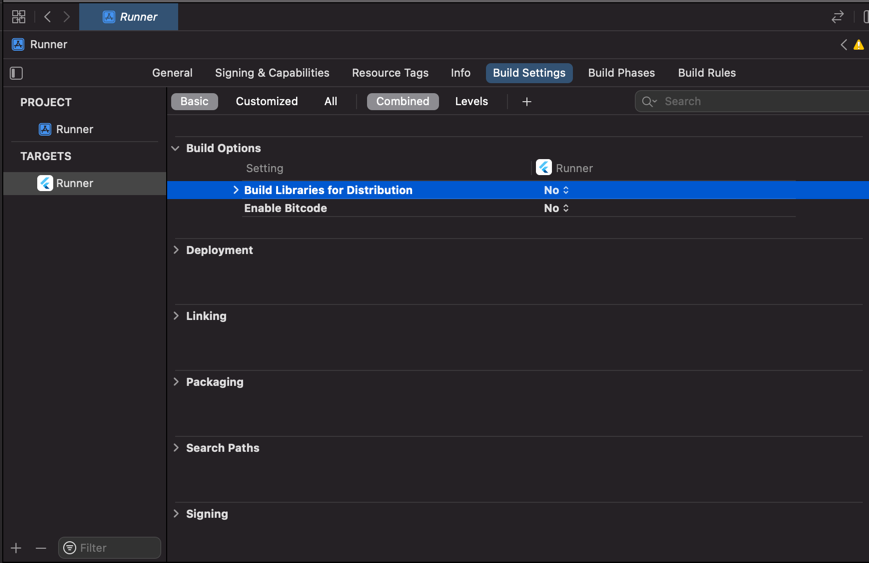
Set Build Libraries for Distribution in Build Settings to No
3. Precompile
$ pod install
Android
Add to root-level build.gradle file (host app):
def localProperties = new Properties()
def localPropertiesFile = rootProject.file('local.properties')
if (localPropertiesFile.exists()) {
    localPropertiesFile.withReader('UTF-8') { reader ->
        localProperties.load(reader)
    }
}

def flutterRoot = localProperties.getProperty('flutter.sdk')
if (flutterRoot == null) {
    throw new GradleException("Flutter SDK not found. Define location with flutter.sdk in the local.properties file.")
}

allprojects {
    repositories {
        google()
        mavenCentral()

        /*
        Replace the below with your path to `trust_vision_plugin` Android repo which downloaded by `flutter pub get`.
        */
        maven { url "$flutterRoot/.pub-cache/git/replace_by_git_repo_name-replace_by_commit_hash/android/repo" }
        /*
        For example:
        maven { url "$flutterRoot/.pub-cache/git/tv_flutter_sdk_xyz-1a5eb61ccb44ffafa4d3557f4d9d8087bc1a4666/android/repo" }
        */
    }
}
Add to app/build.gradle:
aaptOptions {
    noCompress "tflite"
    noCompress "lite"
}
Usage
import 'package:trust_vision_plugin/enums.dart';
import 'package:trust_vision_plugin/trust_vision_plugin.dart';
1. Initialize SDK
Before using any TV SDK functions, it needs to be successfully initialized once.
void _initTVSDK() async {
  try {
    final initResult = await TrustVisionPlugin.initialize(
            'input_your_access_key',
            'input_your_secret_key',
            'input_your_endpoint',
            'input_your_x-request-id',
            true);
    print("Init Result: $initResult");
  } catch (exception) {
    print("Exception: $exception");
  }
}
2. Get supported ID card types list
After the SDK is initialized, use this method to get supported ID card types list
final cardTypes = await TrustVisionPlugin.getCardTypes();
Where:
- cardTypes: array of CardType objects
- CardType objects:
- id:
String. Card's identification code - name:
String. Card's name - orientation:
Orientation. Card's orientation - hasBackSide:
Bool. This type of card has back side to be read or not
- id:
3. ID card capturing
3.1. Configuration
Change the following parameters to suit your needs.
final selectedCardType = cardTypes[index];

final idCardConfig = {
    "cardType": selectedCardType,
    "cardSide": CardSide.front.name,
    "isEnableSound": true,
    "isEnableSanityCheck": true,
    "isReadBothSide": false,
    "skipConfirmScreen": true,
    "isEnableDetectingIdCardTampering": true,
};
Where:
- cardType:
CardType. Card type - cardSide:
CardSide. Card side (front or back) - isEnableSound:
bool. enable/disable guiding sound - isEnableSanityCheck:
bool. Id card sanity checking should be enabled or not - isReadBothSide:
bool. whether or not read both sides of the selected id card at one flow - skipConfirmScreen:
bool. Whether or not TV SDK should skip its own confirmation screen. - isEnableDetectingIdCardTampering:
bool. enable/disable ID card tampering detection
3.2. Start ID card capturing
final result = await TrustVisionPlugin.captureIdCard(idCardConfig);
4. Selfie capturing
4.1. Configuration
Change the following parameters to suit your needs.
 final selfieConfig = {
        "cameraOption": SelfieCameraMode.front.name,
        "isEnableSound": true,
        "isEnableSanityCheck": true,
        "livenessMode": LivenessMode.active.name,
        "skipConfirmScreen": true
      };
Where:
- cameraOption:
SelfieCameraMode. Camera side - livenessMode:
LivenessMode. Liveness mode - isEnableSound:
bool. enable/disable guiding sound - isEnableSanityCheck:
bool. Selfie sanity checking should be enabled or not - skipConfirmScreen:
bool. Whether or not TV SDK should skip its own confirmation screen.
4.2. Start Selfie capturing
try {
  final result = await TrustVisionPlugin.captureSelfie(selfieConfig);
  print("result: $result");
} catch (exception) {
  print("Handle exception: $exception");
}
5. Face matching
try {
  result = await TrustVisionPlugin.faceMatching(imageId1, imageId2);
  print("result: $result");
} catch (exception) {
  print("Handle exception: $exception");
}
Where:
- imageId1:
String. Id of image 1 - e.g image id in the result of selfie capturing - imageId2:
String. Id of image 2 - e.g image id of ID card front side in the result of ID capturing
6. Result Handling:
6.1. Result Object:
result:
- cardType:
CardType. Card type - actionMode:
ActionMode. Action Mode - compareFaceResult:
CompareImageResult. Compare face Result - cardInfoResult:
CardInfoResult. Card information result - livenessResult:
LivenessResult. Liveness result - idSanityResult:
SanityResult. Id card sanity result - selfieSanityResult:
SanityResult. Selfie sanity result - idTamperingResult:
TamperingResult. ID tampering result - selfieImages:
[SelfieImage]. List of selfie image objects - idFrontImage:
ImageClass. Id front image object - idBackImage:
ImageClass. Id back image object - livenessFrameBatchIds:
[String]. List of frame batch ids recorded during selfie capturing - frontCardFrameBatchIds:
[String]. List of frame batch ids recorded during ID card front side capturing - backCardFrameBatchIds:
[String]. List of frame batch ids recorded during ID card back side capturing
- cardType:
SelfieImage:
- gesture_type:
String.UP | DOWN | LEFT | RIGHT | FRONTAL - frontal_image:
ImageClass. Frontal image object - gesture_image:
ImageClass. Gesture image object
- gesture_type:
ImageClass:
- raw_image_base64:
String. Base64 string of image data - image_id:
String. Image id
- raw_image_base64:
CompareImageResult:
- score:
float. The score from 0 to 1 - matchResult:
CompareImageResult. - requestId:
String. Id of request
- score:
CardInfoResult:
- infos: array of
CardInfo - requestId:
String. Id of request
- infos: array of
CardInfo:
- field:
String. Name of field example name, address... - value:
String. The value of each field
- field:
LivenessResult:
- score:
float. The score from 0 to 1 - isLive:
bool. Selfie image is live or not - requestId:
String. Id of request
- score:
SanityResult:
- isGood:
bool. Sanity is good or not - score:
float. The score from 0 to 1 - requestId:
String. Id of request - error:
Error. Error object
- isGood:
TamperingResult:
- isGood:
bool. If it is true means there should be no tampering - score:
float. The score from 0 to 1 - requestId:
String. Id of request - error:
Error. Error object
- isGood:
Error:
- errorCode:
String. The specific error code - description:
String. The human-readable error description can be show to end user
- errorCode:
6.2. Sanity result error handling
6.2.1. Id sanity
final idSanityResult = result["idSanityResult"];
if (idSanityResult != null && idSanityResult["error"]) {
    switch (result.idSanityResult.error) {
        case 'image_too_blur':
            // Image is too blurry
            break;
        case 'image_too_dark':
            // Image is too dark
            break;
        case 'image_too_bright':
            // Image is too bright
            break;
        case 'image_has_hole':
            // Image has holes
            break;
        case 'image_has_cut':
            // Images has been cut
            break;
        case 'image_has_hole_and_cut':
            // Images has holes and has been cut
            break;
    }
}
6.2.2. Selfie sanity
final selfieSanityResult = result["selfieSanityResult"];
if (selfieSanityResult != null && selfieSanityResult["error"] != null) {
    switch (selfieSanityResult["error"]) {
        case 'image_too_blur':
            // Image is too blurry
            break;
        case 'image_too_dark':
            // Image is too dark
            break;
        case 'image_too_bright':
            // Image is too bright
            break;
        case 'not_white_background':
            // The background is not white enough
            break;
        case 'not_qualified':
            // The face is not qualified, could be occluded, covered or having something unusal
            break;
        case 'image_has_multiple_faces':
            // Image has multiple faces
            break;
        case 'image_has_no_faces':
            // Image does not have any face
            break;
        case 'right':
            // Face is looking to the right
            break;
        case 'left':
            // Face is looking to the left
            break;
        case 'open_eye,closed_eye':
            // Right eye is closed
            break;
        case 'closed_eye,open_eye':
            // Left eye is closed
            break;
        case 'open_eye,sunglasses':
            // Sunglass covers the right eye
            break;
        case 'sunglasses,open_eye':
            // Sunglass covers the left eye
            break;
        case 'closed_eye,closed_eye':
            // Both eyes are closed
            break;
        case 'closed_eye,sunglasses':
            // Left eye is closed, sunglass covers the right eye
            break;
        case 'sunglasses,closed_eye':
            // Sunglass covers the right eye, right eye is closed
            break;
        case 'sunglasses,sunglasses':
            // Sunglasses cover both eyes
            break;
    }
}
7. Error handling
switch (e.code) {
    // local error
    case TVErrorCode.authentication_missing_error.name:
    case TVErrorCode.internal_error.name:
    case TVErrorCode.sdk_canceled.name:
        print('Error: ' + e.code + ' - ' + e.message);
        break;
    default:
        // error from backend
        print('Error: ' + e.code + ' - ' + e.message);

        switch (e.code) {
            // connection errors
            case 'timeout_error':
                // Network timeout. Poor internet connection.
            case 'network_error':
                // Network error. No internet connection

            // Id capturing
            case 'incorrect_card_type':
                // the input image is not same type with selected card
                break;
            case 'nocard_or_multicard_image':
                // the input image is no card or multicard detected
                break;

            // Selfie capturing
            case 'image_has_no_faces':
                // face not detected in selfie image
                break;
            case 'image_has_multipe_faces':
                // multiple faces are detected in selfie image
                break;

            // Common errors
            case 'access_denied_exception':
                break;
            case 'invalid_parameter_exception':
                break;
            case 'rate_limit_exception':
                break;
            case 'internal_server_error':
                break;
        }

        break;
}
 Previous